| |
|
|
|
 EN
EN
 RU
RU
|
|
|
|
|
FREE PHOTO SLIDESHOW
2.25.4.14
|
|


Have you ever wanted to view all the digital photos and other
images without opening each individually (one after another)?
Well, Free Photo SlideShow Software displays your images
in a folder continuously, and you do not need to do anything (Software
SlideShow). You just point to a folder; designate, how long
each picture should be displayed, select transition effects, and
then sit back and watch. If a picture is too large or too small
for your screen, it is automatically resized to fit the screen,
keeping the aspect ratio.
|
Free Photo Slideshow features
|
SUPPORTED IMAGE FORMATS
- Load up multiple formats of images including tif,
tiff, fax, gif, jpg, jpeg, jpe, pcx, bmp, dib, rle,
ico, cur, png, wmf, emf, tga, targa, vda, icb, vst,
pix, pxm, ppm, pgm, pbm.
-
WIC formats (Windows Imaging Component).
Extensions *.dds,*.wdp, *.jxr, *.hdp, *.heic, *.heif,
*.heics, *.avcs, *.heifs, *.webp
IMAGE VIEWING
- View slideshows with 100 transitional effects
(with preview).
- Full screen mode. Hide cursor on full screen mode.
- Preview the images while loading the list.
- You would not need to worry about different image
dimensions or file types, since Free Photo Slide
Show would resample the images on-the-fly prior
to loading them up on screen.
- You will get perfectly centered images each time.
- The number of images is shown in the upper part
of the window (when the first image out of 16 is displayed,
it reads 1/16).
- Slideshow Auto-start.
- Sorting by Name and by Date.
- Start and Stop buttons.
- Viewing all items in the folder (and subfolder).
- Sequence options (forward, reverse, and random).
- Repeat slideshow option.
- Slide delay adjustment.
- Background color or images selection.
- Gradient filling.
- Transition delay adjustment.
- HotKey buttons (Front, Back, Stop, Start, Caption
panel, Exit from full screen mode)
|
Do you need additional features?
Try to use other our SlideShow programs
- Easy Photo SlideShow
and Able Photo SlideShow.
|
Features: compare versions of the program
|
| Features |
Free
Photo SlideShow |
Easy
Photo SlideShow |
Able
Photo SlideShow |
|
Display photos from one folder
|
 |
|
|
|
Display photos from several folders
at once
|
 |
|
|
| Full-screen mode |
|
|
|
| Rotating |
|
|
|
| Transition effects |
100
|
250
|
250
|
| Slideshow sequence |
|
|
|
| Scaling options |
|
|
|
| Background settings |
|
|
|
| Sound playback |
|
|
|
| Folder monitoring |
|
|
|
| Multiple images per slide |
|
|
|
| Caption bar |
|
|
|
| Image browser (rename, move, copy, delete, rotate,
flip, resize, remove red eyes, color adjust, effects
etc.)
|
|
|
|
| Project manager |
|
|
|
| Synchronization of slides with audio |
|
|
|
| List of favorite effects |
|
|
|
| Buttons size changing |
|
|
|
| Watermarks |
|
|
|
| "Panorama" mode |
|
|
|
| "Zoom" mode |
|
|
|
| Description manager |
|
|
|
| Web gallery |
|
|
|
| Creating executable slideshow
and screensaver files |
|
|
|
| Creating video
slideshow |
|
|
|
| Display animated GIF |
|
|
|
|
Display video files
(AVI, MKV, MP4) |
|
|
|
| Price |
FREE |
$7.95 |
$25 |
| Download |
|
 |
|
| Buy Now |
|
 |
|
|
Screenshots (click thumbnails to see big image)
|
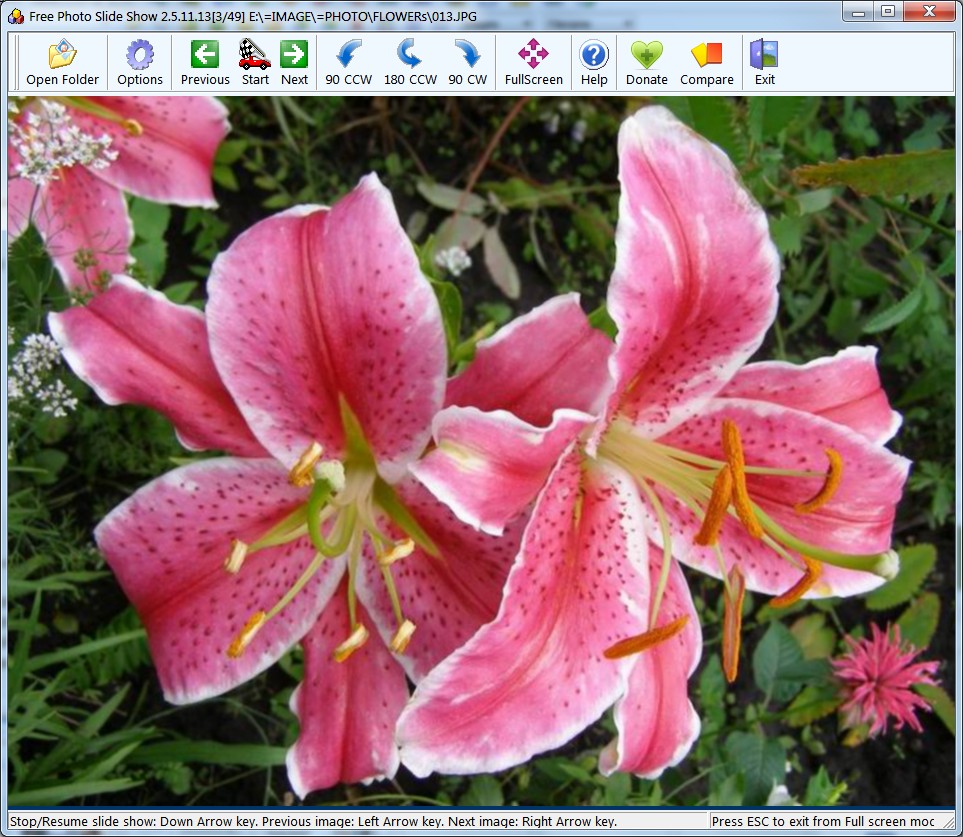
| 1. Main Window

|
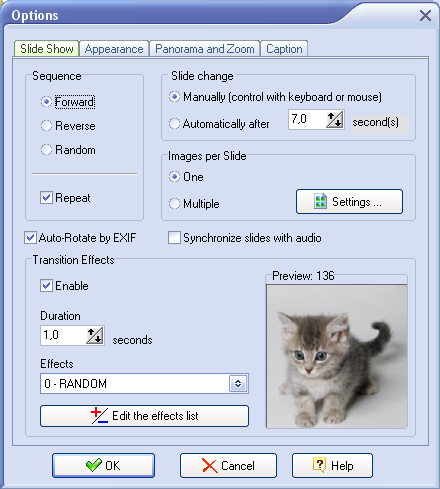
2. Options 1.

|
|
|
2. Options 2.

|
|
|
Download, Donate, Help
|
 |
| File size:
6.7M |
|
| Free Photo SlideShow is
free for personal and
educational (including non-profit organizations) use. In
this cases, you are granted the right to use and to make
an unlimited number of copies of this software.
If you think "Free Photo SlideShow" is a valuable program
and would like to help us make it even better, please make
a donation.
Thank you very much.
 Donate USD 5
Donate USD 10
|
|
Awards, Press release
|
Please read some of our customers'
TESTIMONIALS,
read our PRESS RELEASE
and see our AWARDS.
|
Subscribe
|
We are working at the moment on other graphic tools. If you think
you would be interested in such programs and future releases of
Free Photo SlideShow, please subscribe
to our mailing lists on these products and we'll let you know when
they are released. All details are here.
|
|
|
|
|
SUBSCRIBE
to our free
monthly newsletter
to get discount
|
|
|
Follow us:



|
|
|
|


 RSS Feed