|
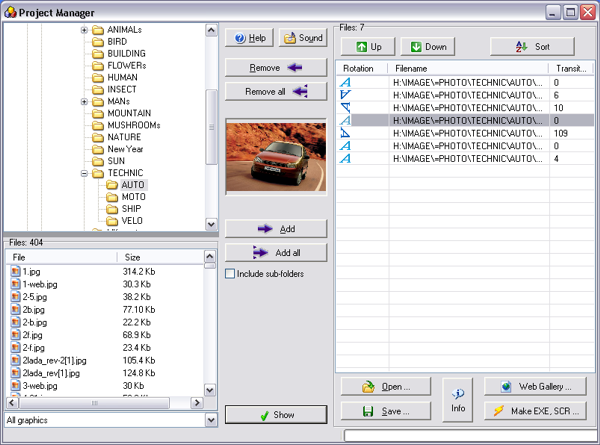
The Project Manager
allows to create the list of graphic files and photos from
different folders for their viewing as a slide show.
Click the "Add" button
to add the file to project. For this purpose it is possible to use
drag-and-drop and double click.
Click the "Add all"
button to select every image in the directory with the supported
extensions.
"Remove" and
"Remove all" take chosen
files back out.
Click the "Save" button
to write project (list of graphic files) to the file with TXT or
PSSP (Photo Slide Show Project) extension.
A
Click the "Open" button
to read project (list of graphic files) from the file with TXT or
PSSP extension.d
You can use "Up",
"Down" and "Sort" buttons for image manipulation on
the list.
You can set individual rotation and transition effect for each
image.
=========================================================================
Able Photo Slide Show
allows you to create standalone
executable slide shows.
To create a standalone slide show:
Choose files on the left from a file list (under a folders tree)
and press "Add" or
"Add all" buttons or double
clicked on the selected file.
Press "Make EXE, SCR"
button when finished collection of required files for viewing in
the right panel.
In the dialog box, choose the filename and folder for the
standalone slide show, the file type (conventional executable file
or a screen saver).
Click the "Save" button
to save the slide show under the chosen file name.
|


